This topic and the related tool descriptions provide a complete reference of all tools available for Agent Tools and their configuration options. Every tool entry lives in the tools list of the Agent Tools asset configuration (agentConfigurationPrompt.tools). Each entry is a dict/object containing at least the id field.
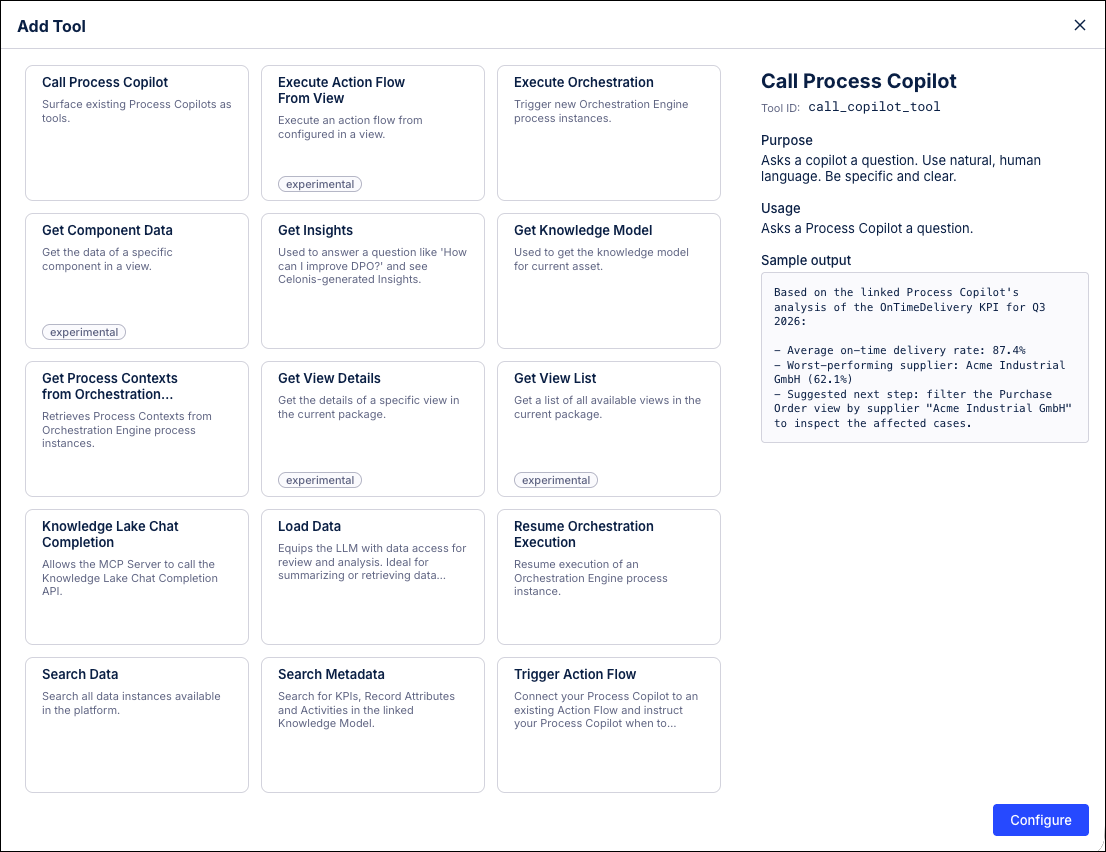
The following tools can be enabled for your Agent Tools/MCP Server assets:
| Tool | Description |
|---|---|
| Call Process Copilot | Delegates a question to a specific Process Copilot. |
| Execute Orchestration | Sends a signal to Orchestration Engine to start a digital process. |
| Get Insights | Finds improvement potential by analyzing a KPI against record attributes. |
| Get Knowledge Model | Returns the knowledge model for the current asset. |
| Get Process Contexts from Orchestration Engine | Lists or queries digital process instances from Orchestration Engine. |
| Load Data | The primary tool for loading data from the knowledge model. |
| Resume Orchestration Execution | Resumes a paused Orchestration Engine process instance. |
| Search Data | Searches for record instances using keyword matching or semantic search. |
| Trigger Action Flow | Connects your asset to an Action Flow. |
- get_insights: Works independently. Does not require
load_data.
Tools that query data (load_data, get_insights, search_data) operate on the KPIs, record attributes, filters, and event logs defined in the knowledge_input section of the Agent Tools config. If a column ID referenced in a tool config does not exist in the knowledge model, the tool will fail at runtime.
You can have multiple instances of the same tool type (e.g., several load_data or trigger_action_flow entries). Each instance beyond the first must have a unique_id. The tool name exposed to the LLM becomes {tool_id}_{unique_id} (e.g., load_data_get_overdue_invoices), so choose descriptive unique_id values as they help the LLM pick the right tool.
The Description field overrides the default tool description shown to the LLM. This is especially important for custom-mode tools where a good description tells the LLM when to use this specific tool instance. For example, "Use when the user asks about overdue invoices" is much more useful than "Loads invoice data".
Each tool supports these base fields:
id: <tool_id>             # Required — identifies the tool type
description: <string>     # Optional — override the default tool description shown to the LLM
active: true              # Optional — enable/disable this tool instance (default: true)
unique_id: <string> # Optional — disambiguate multiple instances of the same tool typeFor most tools with a mode of Both (Intelligent and Custom Configuration), you can pre-fill any subset of the tool's arguments in the YAML config. Any field you set is fixed and hidden from the LLM; any field you leave out is decided by the LLM at runtime. This lets you constrain some aspects of a tool while leaving others flexible.
Exception — load_data: This tool has a hard mode split. Setting columns switches it entirely to custom mode, where the full query (columns, filters, ordering, limit) is defined in config. The LLM fills nothing unless input_schema is defined for ${...} placeholder variables. See Data Load for more details.
| Mode | Meaning |
|---|---|
| Intelligent | LLM decides all arguments at runtime. No pre-filled config beyond base fields. |
| Custom only | Creator must pre-fill the required arguments. The LLM only fills what's declared via input_schema or flow_input_schema. |
| Both | Tool works in either mode. You can pre-fill any subset of fields and the LLM fills the rest. |
tools:
# Intelligent load_data — LLM picks columns, filters, etc.
 - id: load_data

 # Custom load_data — fully pre-configured query, LLM fills nothing
 - id: load_data
   unique_id: get_overdue_invoices
   description: Retrieves overdue invoices with vendor and clearing date.
   columns:
     - id: INVOICE.INVOICE_VENDOR_NAME
     - id: INVOICE.INVOICE_CLEARING_DATE_DAY
     - id: INVOICE.INVOICE_FISCAL_YEAR
   limit: 100

 # Custom load_data — with input variable for dynamic filtering
 - id: load_data
   unique_id: get_invoice_by_id
   description: Look up a specific invoice by number.
   columns:
     - id: INVOICES.INVOICE_NUMBER
     - id: INVOICES.INVOICE_VALUE
   filters:
     - pql_template:
         pql: FILTER "invoices"."Invoice Number" in ('${invoice_number}')
         name: Invoice Number Filter
   input_schema:
     properties:
       invoice_number:
         description: The invoice number to look up.


 # Display tools — intelligent (LLM decides arguments at runtime)
   - id: display_chart
   - id: display_kpi
   - id: display_process

 # Display table — partially configured (fixed columns, LLM decides sorting)
   - id: display_table
     column_ids:
       - INVOICE.INVOICE_NUMBER
       - INVOICE.INVOICE_VENDOR_NAME
       - KPI_INVOICE_VALUE

 # Other intelligent tools
 - id: get_insights
 - id: search_data
 - id: get_process_data
 - id: get_process_model
 - id: python

 # Action flow — LLM fills the declared inputs
 - id: trigger_action_flow
   unique_id: send_email
   flow_key: my-package.email-scenario
   flow_display_name: Send Email
   flow_input_schema:
     type: object
     required:
       - email
       - body
     properties:
       email:
         type: string
         description: Recipient email address.
       body:
         type: string
         description: Email body text.

 # Delegate to another Copilot
 - id: call_copilot_tool
   unique_id: vendor_copilot
   description: Delegates vendor questions to the vendor management copilot.
   root_with_key: rootNodeKey.assetKey

 # Document search with customer vector store
   - id: document_search
     topics:
       - public_docs
     vector_store_id: my-docs-store