Power Platform API (Legacy)
NOTE: The legacy APIs in this section are not recommended for new implementations. We recommend using the APIs in the Business Manager section for your integrations with the Celonis Platform.
Use these APIs to work with Celonis Process Management elements inside of the Microsoft Power Platform. This API have a flat response format optimized for the Microsoft environment.
You can access the Swagger definition of these APIs using this URL: https://pz.symbioweb.com/swagger/index.html?url=/swagger/v1/swagger.json - replace "pz.symbioweb.com" with the hostname (and port) of your Celonis Process Management instance.
Format
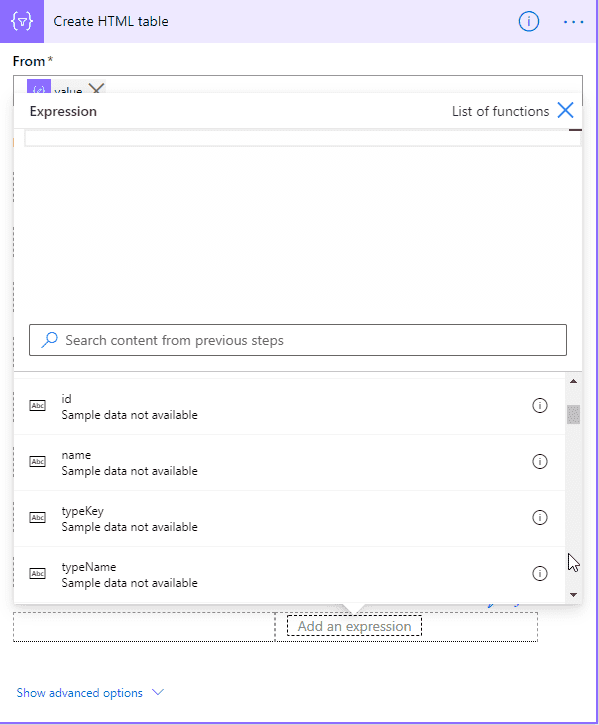
The format is in form of a very flat object with unique property names for easier selection of the properties inside of the Power Platform editors. The following json is an example of the response:
{
    "value": [
        {
            "id": "3b146a24-d4df-4315-ab22-5f16befe7252",
            "name": "My test",
            "typeKey": "subProcess",
            "typeName": "Sub process",
            "stateKey": "inProcess",
            "stateName": "In process",
            "createdById": "8a753cb8-e7f4-4da5-a5a9-b4594ddd90c2",
            "createdByName": "token",
            "createdOn": "2020-08-28T10:12:19",
            "changedOn": "0001-01-01T00:00:00",
            "identifier": "MT",
            "authorId": "8a753cb8-e7f4-4da5-a5a9-b4594ddd90c2",
            "authorName": "token",
            "properties": {
                "validUntil": "9999-12-31T00:00:00"
            }
        }
    ]
}
It is easy to use now e. g. in Power Automate. In the following example you can see the selection a value in a Create HTML table action: